


Phishing casts a wide net with generic messages; spear phishing aims a personalized message at a specific person or organization. Both use deception, but spear phishing is harder to spot because it borrows your real projects, colleagues and responsibilities.
In This Guide
Two Emails, Two Different Attacks
What Is Phishing?
What Is Spear Phishing?
8 Key Differences
How a Spear Phishing Attack Works: 6 stages
6 Spear Phishing Examples
Why It Is Hard to Detect
How to Spot It: 6 signals
How to Prevent It: 8 defenses
PhishTop, Penough Services, FAQ and Keep Reading
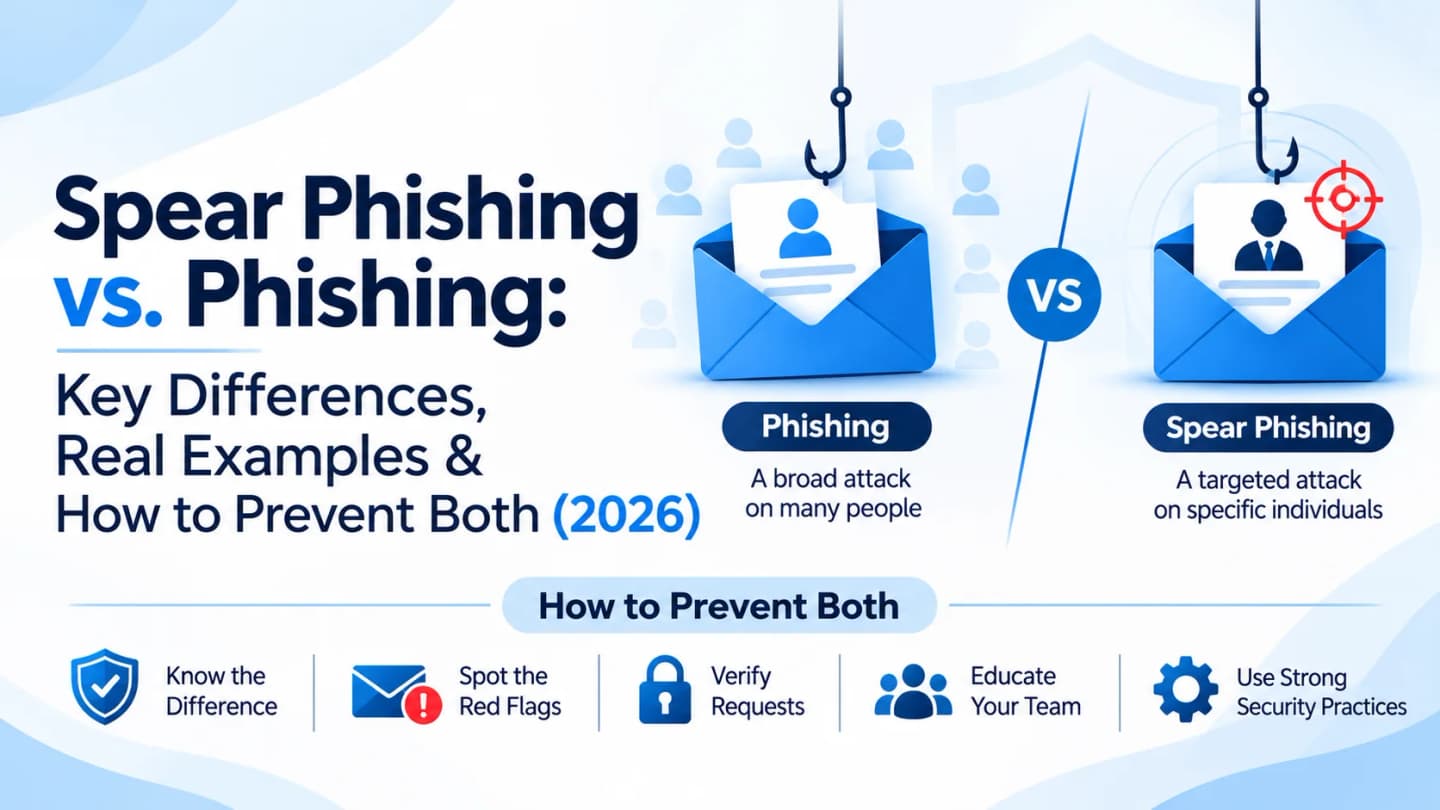
Quick answer: Phishing = broad and generic. Spear phishing = targeted and tailored. Whaling = spear phishing aimed at executives. Defense for all three: verify requests independently, enable MFA, use email authentication, and train and test employees.
Two Emails, Two Different Attacks
Email A: An employee gets a message that their Microsoft 365 account needs immediate verification, with a logo, a login link and a warning that access may be restricted. A generic phishing attempt.
Email B: A finance manager gets a message that appears to come from the CEO, mentions a confidential acquisition and an upcoming meeting, and asks for an urgent payment to a specific account. This one was written for them. That is spear phishing.
What Is Phishing?
Phishing is social engineering: attackers impersonate trusted people, brands or services to push victims into revealing credentials or financial data, clicking malicious links, opening harmful attachments, approving fraudulent payments or granting access. Email is the usual channel, but SMS, calls, social media and collaboration platforms are used too.
How a typical campaign works:
Craft a deceptive message from a familiar brand.
Add a reason to respond: urgency, an account warning, a payment notice.
Steer the victim toward an action such as a link, attachment or QR code.
Exploit it by stealing credentials, delivering malware or taking over an account.
Example: "Your mailbox has exceeded its storage limit. Verify your account immediately." The same text goes to thousands of addresses, hoping a few bite.
What Is Spear Phishing?
Spear phishing is targeted phishing built for specific individuals, organizations or industries, usually after research.
Attackers mine company websites, LinkedIn, social media, employee directories, public announcements, conference talks, job postings and previously exposed data. A finance manager listed on a website plus a public expansion announcement is enough to craft a believable supplier message.
MITRE ATT&CK notes that phishing can be aimed at a specific individual, company or industry, and documents spearphishing sub-techniques (attachments, links, via services, voice) under T1566.
Why "spear"?
Phishing casts a wide net. Spear phishing throws one spear at one target.
Spear Phishing vs. Phishing: 8 Key Differences
Factor | Phishing | Spear Phishing |
|---|---|---|
Target | Broad groups | Specific people, organizations or industries |
Personalization | Generic | Tailored to the recipient |
Research | Little target-specific research | Often reconnaissance on the target |
Content | Common templates | Contextual details: projects, colleagues, processes |
Impersonation | Well-known brands and services | Colleagues, executives, partners, trusted contacts |
Scale | Large distribution | More selective, though campaigns can target many |
Preparation | Can be simple | More planning |
Detection | Generic warning signs are easier to catch | Personalization makes detection harder |
Side by side:
Phishing: a fake delivery notice asking for a small fee, sent to thousands.
Spear phishing: a supplier email referencing a recent order and asking to change the next payment's bank account, sent to the procurement officer.
Is spear phishing always more dangerous? Not necessarily. It is harder to detect, but impact depends on the attacker's goal, the victim's access, your controls and whether it succeeds. A broad campaign that compromises enough accounts, or one valuable target, can cause serious damage too.
How a Spear Phishing Attack Works: 6 Stages
Target selection: executives, finance, HR, IT admins, procurement, anyone with access to confidential data.
Information gathering: names and titles from the website, a conference post, a job ad revealing your cloud tools. Each harmless alone, convincing together.
Message preparation: impersonate an executive, partner, supplier, colleague, IT admin or service provider, referencing a real project, expected document or business process.
Delivery: email most often, but also collaboration tools, social media and voice.
Victim interaction: click, open, enter credentials into a fake login, approve an unauthorized app request, share confidential data or follow payment instructions.
Exploitation: use the compromised account, access more data, impersonate the victim or move deeper into the environment. It becomes an identity, data protection and incident response issue, not just an email issue.
6 Spear Phishing Examples
Scenario | The Lure | What Is at Stake |
|---|---|---|
CEO impersonation | Urgent transfer or gift-card request for a "confidential" matter | Money; overlaps with BEC |
Supplier or vendor impersonation | "We changed bank details; pay the new account" | Payment sent to an attacker |
HR-themed | CV or portfolio attachment from a "candidate" | Malware or malicious site |
IT support impersonation | "Security update: verify your account" | Credentials and access |
Project-based | Real project name plus a document-sharing link | Corporate credentials |
Executive account impersonation | Routine-sounding request for confidential documents | Data disclosure |
The common pattern: trust, authority, familiarity and the expectation that workplace requests deserve a reply.
For a real-world 2026 look at business-themed lures, see the campaigns in Phishing Email Security: Complete Guide.
Why Spear Phishing Is Hard to Detect
Classic phishing leaves visible clues: generic greetings, suspicious links, odd language. Spear phishing deliberately removes them.
Why It Works | What It Looks Like |
|---|---|
Personalization creates familiarity | References your department, project or role |
Sender names mislead | A trusted display name or a lookalike domain |
Business context is exploited | Public announcements, org information or leaked data make requests sound reasonable |
Urgency reduces verification | Payment deadlines, account limits, confidential projects, executive requests |
Legitimate accounts get abused | If an attacker controls a real account, the message comes from a real address, so sender checks alone fail |
How to Spot Spear Phishing: 6 Signals
Signal | What to Do |
|---|---|
Unexpected request for sensitive information: passwords, authentication codes, financial data, customer or employee records, confidential files, system access | Use the official secure process instead |
Unusual payment instructions: bank-detail changes, redirected payments, urgent transfers | Verify through a previously established phone number or trusted channel, not the contact info in the email |
Slightly different sender domain, such as company.com vs. cornpany.com ("rn" imitating "m") | Read the real address, not the display name |
Unexpected links or attachments, even from someone familiar | Confirm through a separate channel |
Pressure to bypass procedure: skip approvals, keep it secret, finish unusually fast | Treat it as a red flag; controls exist for this |
Behavior out of character: a colleague suddenly requests sensitive data | Verify; the account may be compromised |
How to Prevent Spear Phishing: 8 Defenses
Train for targeted attacks: executive impersonation, supplier and invoice fraud, document-sharing requests, credential theft, lookalike domains, unexpected authentication prompts, safe reporting, using examples from employees' own roles.
Run regular simulations: finance gets invoice scenarios, HR gets recruitment lures. See How to Run a Phishing Test on Employees.
Enable MFA, and where possible phishing-resistant methods such as FIDO2 security keys or passkeys.
Implement email authentication: SPF, DKIM and DMARC reduce certain spoofing, though not every impersonation or compromised-account abuse.
Require payment verification: independent confirmation for bank changes, new payment instructions, large or unusual transfers, urgent financial requests and supplier detail changes.
Apply least-privilege access and review privileged accounts regularly.
Strengthen email and endpoint security: secure gateways, EDR, anti-malware, URL filtering, attachment sandboxing, identity and access monitoring.
Monitor and respond: investigate odd logins, unexpected forwarding rules and abnormal access. Treat a reported spear-phishing email as a possible security event, especially after a click or submission.
Because the more convincing an attack becomes, the more important verification becomes.
How PhishTop Strengthens Phishing Awareness
Targeted messages are easiest to resist after practice.
PhishTop by Penough lets you run controlled simulations with scenarios that mirror your teams' real communications (supplier requests, document-sharing invitations, executive impersonation), review campaign analytics, evaluate employee reporting, and compare results across campaigns.
Use results to improve awareness, never to punish.
Test your team on targeted lures: Explore PhishTop.
How Penough's Security Services Support Phishing Defense
Service | How It Helps |
|---|---|
Monitoring, detection and response to suspicious activity | |
VAPT | Finds weaknesses in applications, systems and infrastructure |
DFIR | Investigation and response after a suspected incident |
Red Teaming | Tests defenses through controlled adversarial exercises |
Threat Hunting and Malware Analysis (THMA) | Investigates suspicious activity and malicious software |
Threat intelligence and external attack-surface visibility |
They complement awareness training; see all Penough services and Penough Academy for defensive security skills.
Frequently Asked Questions
What is the main difference between phishing and spear phishing?
Phishing uses broad campaigns against many people. Spear phishing targets specific individuals or organizations with personalized messages.
Is spear phishing more dangerous?
It can be harder to recognize, but impact depends on the attacker's goals, the victim's access and your controls.
What is an example?
An email impersonating the CEO asks a finance employee to make an urgent payment, referencing real internal projects.
How do attackers research targets?
Company websites, social media, public reports, employee directories, job postings and previously exposed data.
Spear phishing vs. whaling?
Whaling is targeted phishing aimed at senior executives or other high-profile individuals.
Can it happen outside email?
Yes: social media, professional networks, collaboration tools and other online services.
Can phishing simulation help?
Yes, with relevant training and technical controls. Simulations let employees practice recognizing and reporting targeted messages.
Does MFA fully prevent it?
No. Some attacks bypass or manipulate authentication. Phishing-resistant MFA, monitoring and awareness together give stronger protection.
Keep Reading
Guide | Why |
|---|---|
The pillar overview | |
Another hard-to-inspect lure | |
Beyond email |
Reference: MITRE ATT&CK T1566 Phishing